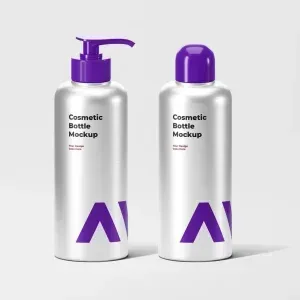
By installing Adobe Photoshop, you can edit this mockup as you wish and customize it in any language.
92.58Mb
ZIP
Ps/CC
300/Dpi
Khalaj.Net
Works out of the box—no extra plugins needed
High-resolution PSD for professional presentations
Step-by-step guide to help customize easily.
Text, colors, objects, and layers with full control
PSD Mockup Cosmetic Packaging Design. This PSD Mockup presents a realistic cosmetic packaging scene designed at 3000 x 2000 pixels resolution. It includes two smart object layers that allow you to easily replace the packaging designs with your own artwork. The mockup supports full customization of cap colors, shadow opacity, and shadow color, enabling you to tailor the presentation to your brand’s style.
The background is fully changeable, giving you flexibility to match different themes or marketing materials. All layers are well organized and clearly named, making the editing process straightforward even for users with basic Photoshop skills. An illustrated PDF quick guide is included to assist you in navigating PSD Mockup Cosmetic Packaging Design and applying your designs efficiently.
This cosmetic packaging mockup is ideal for showcasing product concepts, brand identity presentations, and online portfolios. It suits projects related to beauty products, skincare lines, and cosmetic branding. The editable smart objects streamline your workflow by allowing quick updates without altering the entire composition. Adjusting shadows and cap colors helps simulate different lighting and packaging variations, enhancing the realism of your presentation. The PSD Mockup Cosmetic Packaging Design keeps the product’s main visual purpose clear across the described uses.
Whether you are preparing visuals for client pitches, e-commerce listings, or social media campaigns, this mockup provides a professional and polished look. Its high resolution ensures crisp details for both digital and print use. Overall, this PSD Mockup offers a versatile and user-friendly solution for cosmetic packaging design presentations.
Required Software for Editing
To edit this project, you must have a compatible version of Adobe Photoshop installed on your system.
You may use any of the supported Photoshop versions listed below to open and edit the project file. The version you choose depends on your system specifications, hardware performance, and personal preference.
All supported versions allow full editing of the project, including layers, text, colors, images, and other customizable elements.
Please select the Photoshop version that best matches your computer’s capabilities for optimal performance.
Cracked and installed
Free Download
Cracked and installed
Free Download
Cracked and installed
Free Download
Cracked and installed
Free Download