After Effects Project AI Chat Interface Animations

AE templates

Required software :

By installing After Effects software, you can edit this project as you wish and in any language.

Size :

1.77Mb

Format :

ZIP

Editing :

AE/CC

Quality :

Full/Hd

Password :

Khalaj.Net

Instant Download After Payment

 16

No Plugins :

Works out of the box—no extra plugins needed.

Full HD 1920×1080 :

Full HD for modern screens and platforms.

Video Tutorial:

Step-by-step guide to help customize easily.

Fully Editable :

text, media, timing, and layout with full control.

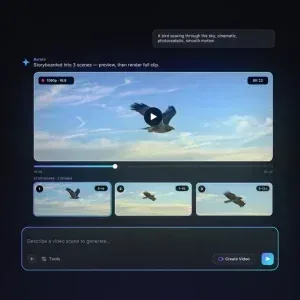
AI Chat Interface Animations for modern tech presentations After Effects Project AI Chat Interface. AI Chat Interface Animations is an After Effects project made for presentations that need a clean and current visual language. It focuses on chatbot screens, message bubbles, and conversation layouts, helping you present an AI product idea with clarity and without unnecessary visual noise. The style feels professional, easy to read, and suitable for business use. After Effects Project AI Chat Interface is a strong fit for startup pitches, software demos, app explainers, product launch videos, and marketing slides for artificial intelligence services. It turns static interface concepts into motion, which makes the message feel more active and polished. If you need to explain a digital service, introduce a new feature, or support a brand story with a modern UI look, this project gives you a practical visual base.

Designed for clear communication The main advantage of AI Chat Interface Animations is the way it presents a chat based workflow with simple rhythm and structure. You can show conversation steps, emphasize key interface moments, and create a focused tech sequence that supports your message instead of distracting from it. That makes it useful for openers, slides, screen based explainers, and short promotional sections where the visual tone must stay sharp and contemporary. The After Effects Project AI Chat Interface keeps the product’s main visual purpose clear across the described uses. It is especially effective when you want to communicate how a chatbot or AI assistant feels in use. Rather than relying on still screenshots alone, the interface moves in a way that gives the viewer a clearer sense of flow and purpose. This helps in presentation decks, online videos, and product previews where the audience needs to understand the idea quickly. Because the design centers on AI Chat Interface Animations, the project also works well for branded tech content that needs a presentation ready look. It can support UI concepts, pitch decks, AI related communication, and short marketing pieces where the interface itself is part of the story. The flexible workflow makes it easier to adapt timing, scene selection, and visual emphasis to your own creative direction.

Product Description :
Required Software :
Required Software for Editing

To edit this project, you must have one of the compatible versions installed on your system.

You may use any of the supported versions listed below to open and edit the project file. The version you choose depends on your system specifications, hardware performance, and personal preference.

All supported versions allow full editing of the project.
Please select the version that best matches your computer’s capabilities for optimal performance.

Adobe
AfterEffects CC2025

Cracked and installed
Free Download

Adobe
AfterEffects CC2025

Cracked and installed
Free Download

Adobe
AfterEffects CC2025

Cracked and installed
Free Download

Adobe
AfterEffects CC2025

Cracked and installed
Free Download

Online chat support :

Similar Products

After Effects Project AI Chat Interface Animations

AE templates

Required software :

By installing After Effects software, you can edit this project as you wish and in any language.

Instant Download After Payment

 16

Size :

1.77Mb

Format :

ZIP

Editing :

AE/CC

Password Zip File (Copy)

Khalaj.Net

No Plugins

Works out of the box no extra plugins needed.

Full HD 1920

Full HD for modern screens and platforms.

Video Tutorial

Step-by-step guide to help customize easily.

Fully Editable

text, media, timing, and layout with full control.

AI Chat Interface Animations for modern tech presentations After Effects Project AI Chat Interface. AI Chat Interface Animations is an After Effects project made for presentations that need a clean and current visual language. It focuses on chatbot screens, message bubbles, and conversation layouts, helping you present an AI product idea with clarity and without unnecessary visual noise. The style feels professional, easy to read, and suitable for business use. After Effects Project AI Chat Interface is a strong fit for startup pitches, software demos, app explainers, product launch videos, and marketing slides for artificial intelligence services. It turns static interface concepts into motion, which makes the message feel more active and polished. If you need to explain a digital service, introduce a new feature, or support a brand story with a modern UI look, this project gives you a practical visual base.

Designed for clear communication The main advantage of AI Chat Interface Animations is the way it presents a chat based workflow with simple rhythm and structure. You can show conversation steps, emphasize key interface moments, and create a focused tech sequence that supports your message instead of distracting from it. That makes it useful for openers, slides, screen based explainers, and short promotional sections where the visual tone must stay sharp and contemporary. The After Effects Project AI Chat Interface keeps the product’s main visual purpose clear across the described uses. It is especially effective when you want to communicate how a chatbot or AI assistant feels in use. Rather than relying on still screenshots alone, the interface moves in a way that gives the viewer a clearer sense of flow and purpose. This helps in presentation decks, online videos, and product previews where the audience needs to understand the idea quickly. Because the design centers on AI Chat Interface Animations, the project also works well for branded tech content that needs a presentation ready look. It can support UI concepts, pitch decks, AI related communication, and short marketing pieces where the interface itself is part of the story. The flexible workflow makes it easier to adapt timing, scene selection, and visual emphasis to your own creative direction.

Product Description
Required Software
Required Software for Editing

To edit this project, you must have one of the compatible versions installed on your system.

You may use any of the supported versions listed below to open and edit the project file. The version you choose depends on your system specifications, hardware performance, and personal preference.

All supported versions allow full editing of the project.
Please select the version that best matches your computer’s capabilities for optimal performance.

Adobe
AfterEffects CC2025

Cracked and installed
Free Download

Adobe
AfterEffects CC2025

Cracked and installed
Free Download

Adobe
AfterEffects CC2025

Cracked and installed
Free Download

Adobe
AfterEffects CC2025

Cracked and installed
Free Download

Online chat support

After Effects Project AI Chat Interface Animations

AE templates

Required software :

By installing After Effects software, you can edit this project as you wish and in any language.

Instant Download After Payment

 16

Size :

1.77Mb

Format :

ZIP

Editing :

AE/CC

Password Zip File :

Khalaj.Net

No Plugins

Works out of the box no extra plugins needed.

Full HD 1920

Full HD for modern screens and platforms.

Video Tutorial

Step-by-step guide to help customize easily.

Fully Editable

text, media, timing, and layout with full control.

AI Chat Interface Animations for modern tech presentations After Effects Project AI Chat Interface. AI Chat Interface Animations is an After Effects project made for presentations that need a clean and current visual language. It focuses on chatbot screens, message bubbles, and conversation layouts, helping you present an AI product idea with clarity and without unnecessary visual noise. The style feels professional, easy to read, and suitable for business use. After Effects Project AI Chat Interface is a strong fit for startup pitches, software demos, app explainers, product launch videos, and marketing slides for artificial intelligence services. It turns static interface concepts into motion, which makes the message feel more active and polished. If you need to explain a digital service, introduce a new feature, or support a brand story with a modern UI look, this project gives you a practical visual base.

Designed for clear communication The main advantage of AI Chat Interface Animations is the way it presents a chat based workflow with simple rhythm and structure. You can show conversation steps, emphasize key interface moments, and create a focused tech sequence that supports your message instead of distracting from it. That makes it useful for openers, slides, screen based explainers, and short promotional sections where the visual tone must stay sharp and contemporary. The After Effects Project AI Chat Interface keeps the product’s main visual purpose clear across the described uses. It is especially effective when you want to communicate how a chatbot or AI assistant feels in use. Rather than relying on still screenshots alone, the interface moves in a way that gives the viewer a clearer sense of flow and purpose. This helps in presentation decks, online videos, and product previews where the audience needs to understand the idea quickly. Because the design centers on AI Chat Interface Animations, the project also works well for branded tech content that needs a presentation ready look. It can support UI concepts, pitch decks, AI related communication, and short marketing pieces where the interface itself is part of the story. The flexible workflow makes it easier to adapt timing, scene selection, and visual emphasis to your own creative direction.

Product Description
Required Software
Required Software for Editing

To edit this project, you must have one of the compatible versions installed on your system.

You may use any of the supported versions listed below to open and edit the project file. The version you choose depends on your system specifications, hardware performance, and personal preference.

All supported versions allow full editing of the project.
Please select the version that best matches your computer’s capabilities for optimal performance.

Adobe
AfterEffects CC2025

Cracked and installed
Free Download

Adobe
AfterEffects CC2025

Cracked and installed
Free Download

Adobe
AfterEffects CC2025

Cracked and installed
Free Download

Adobe
AfterEffects CC2025

Cracked and installed
Free Download

Online chat support
