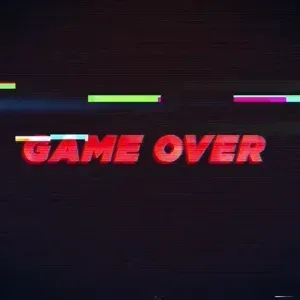
Video Footage Retro Game Over Glitch Effect Text

AE templates

Required Software

By installing After Effects software, you can edit this project as you wish and in any language.

Size

181.16Mb

Format

ZIP

Editing

Ae/Pr

Quality

Full/Hd

Key

Khalaj.Net

Instant Download After Payment

 10

No Plugins

Works out of the box—no extra plugins needed.

Full HD 1920×1080

Full HD for modern screens and platforms.

Video Tutorial

Step-by-step guide to help customize easily.

Fully Editable

text, media, timing, and layout with full control.

Retro Game Over Video Footage

Video Footage Retro Game Over. Retro Game Over Video Footage is built around a final screen mood with a glitch look, subtle scanlines, and a vintage digital finish. It is designed for moments where the visual message needs to feel immediate, tense, and memorable without adding extra graphic clutter. The result feels like a classic arcade warning brought into a modern edit, with enough movement to keep the screen alive and enough restraint to stay readable. Video Footage Retro Game Over works well in gaming content, tech themed edits, dramatic intros, stream highlights, and transition moments that need a sharp conclusion. The retro treatment gives the screen a nostalgic digital feel, while the motion keeps the result active and current enough for contemporary cuts. It can support fail screens, warning beats, end cards, or a sudden scene break when you want the audience to notice the shift right away. Retro Game Over Video Footage focuses on a clear Game Over feeling, so it helps create a brief pause before the story moves on. That makes it useful in edits where the ending should feel intentional rather than soft or decorative. The visual language is simple, direct, and easy to place inside fast paced content. Subtle scanlines reinforce the old monitor atmosphere, and the glitch motion adds urgency without making the frame hard to follow. The Video Footage Retro Game Over keeps the product’s main visual purpose clear across the described uses.

Practical uses and workflow

Use Retro Game Over Video Footage in gameplay edits, teaser sequences, technology presentations, stream recaps, or stylized openers that need a vintage digital touch. It also works as a transition when a scene must end with force instead of fading away quietly. For creators building a retro or arcade inspired sequence, this footage gives a strong visual base that can sit between clips, close a chapter, or underline a key moment. Because the concept is focused and versatile, it can fit both short social clips and longer video projects. The footage is also easy to pair with gaming audio cues, glitch cuts, or dramatic timing in an edit. If your project needs a clear visual conclusion with nostalgic energy, this asset delivers a direct screen effect that feels familiar, impactful, and ready for creative workflow use.
Product Description :
Required Software :
Required Software for Editing

To edit this project, you must have one of the compatible versions installed on your system.

You may use any of the supported versions listed below to open and edit the project file. The version you choose depends on your system specifications, hardware performance, and personal preference.

All supported versions allow full editing of the project.
Please select the version that best matches your computer’s capabilities for optimal performance.

Adobe
AfterEffects CC2025

Cracked and installed
Free Download

Adobe
AfterEffects CC2025

Cracked and installed
Free Download

Adobe
AfterEffects CC2025

Cracked and installed
Free Download

Adobe
AfterEffects CC2025

Cracked and installed
Free Download

Online chat support :

Similar Products

Video Footage Retro Game Over Glitch Effect Text
AE templates

Required Software

By installing After Effects software, you can edit this project as you wish and in any language.

Size

181.16Mb

Format

ZIP

Editing

Ae/Pr

Quality

Full/Hd

Key

Khalaj.Net

Instant Download After Payment

 10

No Plugins

Works out of the box—no extra plugins needed.

Full HD

Full HD for modern screens and platforms.

Video Tutorial

Step-by-step guide to help customize easily.

Fully Editable

text, media, timing, and layout with full control.

Retro Game Over Video Footage

Video Footage Retro Game Over. Retro Game Over Video Footage is built around a final screen mood with a glitch look, subtle scanlines, and a vintage digital finish. It is designed for moments where the visual message needs to feel immediate, tense, and memorable without adding extra graphic clutter. The result feels like a classic arcade warning brought into a modern edit, with enough movement to keep the screen alive and enough restraint to stay readable. Video Footage Retro Game Over works well in gaming content, tech themed edits, dramatic intros, stream highlights, and transition moments that need a sharp conclusion. The retro treatment gives the screen a nostalgic digital feel, while the motion keeps the result active and current enough for contemporary cuts. It can support fail screens, warning beats, end cards, or a sudden scene break when you want the audience to notice the shift right away. Retro Game Over Video Footage focuses on a clear Game Over feeling, so it helps create a brief pause before the story moves on. That makes it useful in edits where the ending should feel intentional rather than soft or decorative. The visual language is simple, direct, and easy to place inside fast paced content. Subtle scanlines reinforce the old monitor atmosphere, and the glitch motion adds urgency without making the frame hard to follow. The Video Footage Retro Game Over keeps the product’s main visual purpose clear across the described uses.

Practical uses and workflow

Use Retro Game Over Video Footage in gameplay edits, teaser sequences, technology presentations, stream recaps, or stylized openers that need a vintage digital touch. It also works as a transition when a scene must end with force instead of fading away quietly. For creators building a retro or arcade inspired sequence, this footage gives a strong visual base that can sit between clips, close a chapter, or underline a key moment. Because the concept is focused and versatile, it can fit both short social clips and longer video projects. The footage is also easy to pair with gaming audio cues, glitch cuts, or dramatic timing in an edit. If your project needs a clear visual conclusion with nostalgic energy, this asset delivers a direct screen effect that feels familiar, impactful, and ready for creative workflow use.
Product Description :
Required Software :
Required Software for Editing

To edit this project, you must have one of the compatible versions installed on your system.

You may use any of the supported versions listed below to open and edit the project file. The version you choose depends on your system specifications, hardware performance, and personal preference.

All supported versions allow full editing of the project.
Please select the version that best matches your computer’s capabilities for optimal performance.

Adobe
AfterEffects CC2025

Cracked and installed
Free Download

Adobe
AfterEffects CC2025

Cracked and installed
Free Download

Adobe
AfterEffects CC2025

Cracked and installed
Free Download

Adobe
AfterEffects CC2025

Cracked and installed
Free Download

Online chat support :
Video Footage Retro Game Over Glitch Effect Text
AE templates

Required Software

By installing After Effects software, you can edit this project as you wish and in any language.

Size

181.16Mb

Format

ZIP

Editing

Ae/Pr

Quality

Full/Hd

Key

Khalaj.Net

Instant Download After Payment

 10

No Plugins

Works out of the box—no extra plugins needed.

Full HD

Full HD for modern screens and platforms.

Video Tutorial

Step-by-step guide to help customize easily.

Fully Editable

text, media, timing, and layout with full control.

Retro Game Over Video Footage

Video Footage Retro Game Over. Retro Game Over Video Footage is built around a final screen mood with a glitch look, subtle scanlines, and a vintage digital finish. It is designed for moments where the visual message needs to feel immediate, tense, and memorable without adding extra graphic clutter. The result feels like a classic arcade warning brought into a modern edit, with enough movement to keep the screen alive and enough restraint to stay readable. Video Footage Retro Game Over works well in gaming content, tech themed edits, dramatic intros, stream highlights, and transition moments that need a sharp conclusion. The retro treatment gives the screen a nostalgic digital feel, while the motion keeps the result active and current enough for contemporary cuts. It can support fail screens, warning beats, end cards, or a sudden scene break when you want the audience to notice the shift right away. Retro Game Over Video Footage focuses on a clear Game Over feeling, so it helps create a brief pause before the story moves on. That makes it useful in edits where the ending should feel intentional rather than soft or decorative. The visual language is simple, direct, and easy to place inside fast paced content. Subtle scanlines reinforce the old monitor atmosphere, and the glitch motion adds urgency without making the frame hard to follow. The Video Footage Retro Game Over keeps the product’s main visual purpose clear across the described uses.

Practical uses and workflow

Use Retro Game Over Video Footage in gameplay edits, teaser sequences, technology presentations, stream recaps, or stylized openers that need a vintage digital touch. It also works as a transition when a scene must end with force instead of fading away quietly. For creators building a retro or arcade inspired sequence, this footage gives a strong visual base that can sit between clips, close a chapter, or underline a key moment. Because the concept is focused and versatile, it can fit both short social clips and longer video projects. The footage is also easy to pair with gaming audio cues, glitch cuts, or dramatic timing in an edit. If your project needs a clear visual conclusion with nostalgic energy, this asset delivers a direct screen effect that feels familiar, impactful, and ready for creative workflow use.
Product Description :
Required Software :
Required Software for Editing

To edit this project, you must have one of the compatible versions installed on your system.

You may use any of the supported versions listed below to open and edit the project file. The version you choose depends on your system specifications, hardware performance, and personal preference.

All supported versions allow full editing of the project.
Please select the version that best matches your computer’s capabilities for optimal performance.

Adobe
AfterEffects CC2025

Cracked and installed
Free Download

Adobe
AfterEffects CC2025

Cracked and installed
Free Download

Adobe
AfterEffects CC2025

Cracked and installed
Free Download

Adobe
AfterEffects CC2025

Cracked and installed
Free Download

Online chat support :