


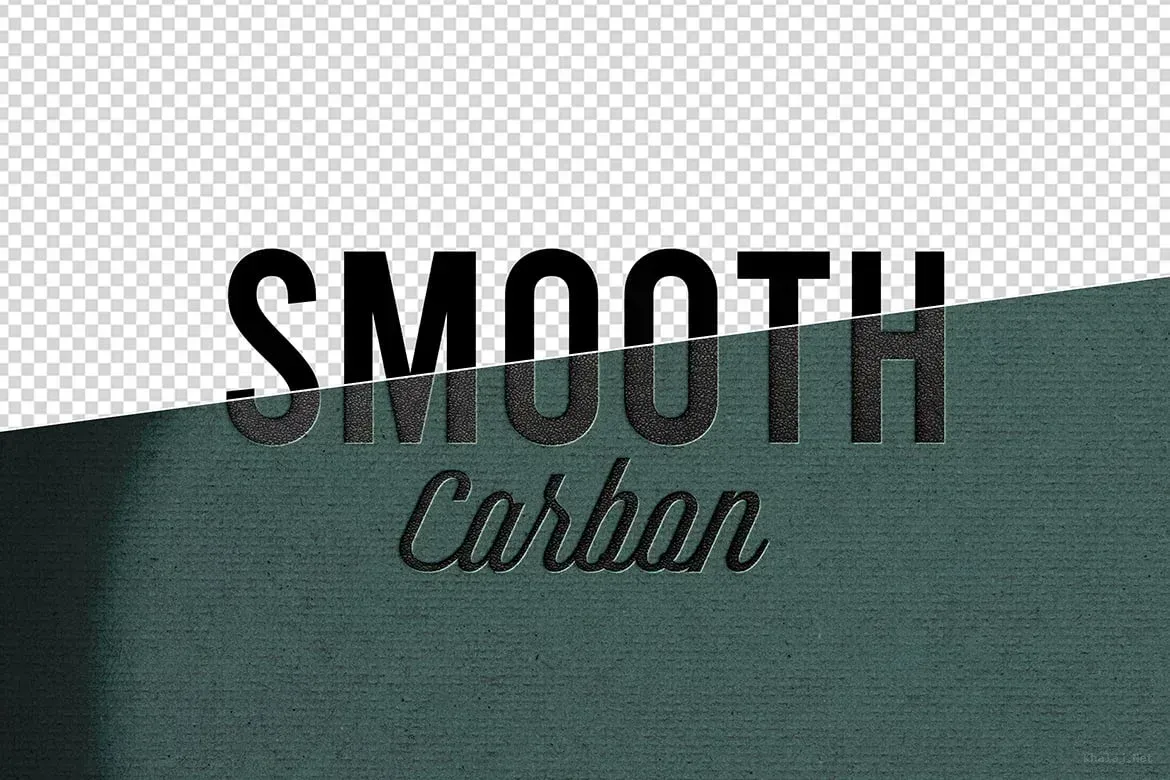
By installing Adobe Photoshop, you can edit this mockup as you wish and customize it in any language.
33.32Mb
ZIP
Ps/CC
300/Dpi
Khalaj.Net
Works out of the box—no extra plugins needed
High-resolution PSD for professional presentations
Step-by-step guide to help customize easily.
Text, colors, objects, and layers with full control
PSD Mockup Smooth Logo Presentation. This PSD Mockup offers a smooth and elegant way to present your logo designs. It includes one high-resolution PSD file with dimensions of 3000×2000 pixels at 72 dpi, ideal for digital presentations and online portfolios. The mockup features smart object layers that allow you to easily insert your logo design with just a few clicks, making the editing process straightforward and efficient.
You can personalize the background colors to match your branding or project theme, enhancing the visual impact of your presentation. Additionally, the mockup provides two shadow options and a textured background to add depth and realism to your logo display. This flexibility makes it suitable for various uses such as banners, posters, social media profiles, and client presentations. The PSD Mockup Smooth Logo Presentation keeps the product’s main visual purpose clear across the described uses.
Designed for both personal and professional projects, this mockup streamlines your workflow by enabling quick adjustments without compromising quality. The file is compatible with Photoshop CC and later versions, ensuring broad usability. Whether you are a designer showcasing your portfolio or a marketer preparing promotional materials, this PSD Mockup is a practical tool to elevate your visual content.
Required Software for Editing
To edit this project, you must have a compatible version of Adobe Photoshop installed on your system.
You may use any of the supported Photoshop versions listed below to open and edit the project file. The version you choose depends on your system specifications, hardware performance, and personal preference.
All supported versions allow full editing of the project, including layers, text, colors, images, and other customizable elements.
Please select the Photoshop version that best matches your computer’s capabilities for optimal performance.
Cracked and installed
Free Download
Cracked and installed
Free Download
Cracked and installed
Free Download
Cracked and installed
Free Download


