By installing Adobe Photoshop, you can edit this mockup as you wish and customize it in any language.
32.1Mb
ZIP
Ps/CC
300/Dpi
Khalaj.Net
Works out of the box—no extra plugins needed
High-resolution PSD for professional presentations
Step-by-step guide to help customize easily.
Text, colors, objects, and layers with full control
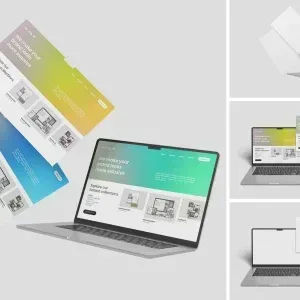
PSD Mockup Laptop Screen Website. PSD Mockup Laptop Screen is designed to present website layouts on a realistic laptop display in a way that feels clear, polished, and easy to review. It is a practical choice when you want to show a homepage, landing page, dashboard, or any other web interface without distracting the viewer from the design itself. The composition keeps the attention on the screen, so your work stays readable and looks ready for client presentation.
The mockup is built with smart objects, which makes the editing process quick and straightforward. You can place your artwork, replace the preview content, and generate a finished presentation image without rebuilding the scene. Organized layers and folders keep the PSD easy to navigate, so adjustments stay efficient even when you need to revise the design more than once. The background color is customizable, giving you control over how the final image supports the look and mood of your project. The PSD Mockup Laptop Screen Website keeps the product’s main visual purpose clear across the described uses.
This PSD Mockup Laptop Screen works well for portfolio images, client approvals, product pages, social previews, and other presentation materials where a website needs to be shown in a believable device setting. It is especially helpful for responsive web concepts, UI concepts, and brand website showcases, because the laptop frame gives the design a grounded and professional appearance. The high resolution of 4500×3000 px at 300 dpi helps keep the result sharp for digital display and presentation use. The PSD Mockup Laptop Screen Website presents the key product details in a consistent and readable way.
The package includes 2 PSD files and a TXT help file. That gives you a simple setup for building presentation images while keeping the workflow manageable in Photoshop CC. Images or designs used in the preview are not included, so you can focus on inserting your own creative work and shaping the final look around your project needs. For designers who want a clean way to present web design with confidence, this mockup offers a direct and dependable editing process.
Required Software for Editing
To edit this project, you must have a compatible version of Adobe Photoshop installed on your system.
You may use any of the supported Photoshop versions listed below to open and edit the project file. The version you choose depends on your system specifications, hardware performance, and personal preference.
All supported versions allow full editing of the project, including layers, text, colors, images, and other customizable elements.
Please select the Photoshop version that best matches your computer’s capabilities for optimal performance.
Cracked and installed
Free Download
Cracked and installed
Free Download
Cracked and installed
Free Download
Cracked and installed
Free Download